
Screenshots
About Photo Keypad Lock Screen
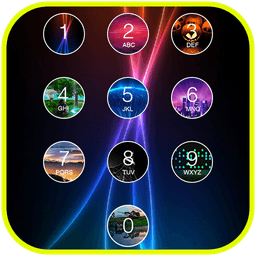
Photo Keypad Lock Screen is a customizable keypad lock screen application that replaces your default device lock with an iOS-style keyboard interface and photo-based security. Unlike standard slide-to-unlock methods, this app lets you set a personalized 4-digit password or passcode while adding your own photos to each keypad button—making your lock screen both secure and visually unique.
Enhance your phone security with a PIN-based unlock system that completely disables the home, menu, and back keys, preventing unauthorized access without the correct password. The intuitive passcode entry mimics Apple's iOS keyboard design, giving your Android device a familiar and polished feel. You maintain full control over the unlock experience: customize the 'Slide to unlock' text color, choose from multiple unlock animations, and select a random keyboard layout for added security.
Personalize every aspect of your lock screen to match your style. Import photos from your gallery to set as custom passcode button images, or choose from the app's built-in wallpaper collection. Apply a glass effect background that consumes minimal memory and battery while maintaining stunning HD visuals. Your lock screen displays real-time clock and date information, unread message counts, missed call notifications, and even message preview content—keeping you informed at a glance.
Access key features directly from your lock screen without unlocking your device. Launch your camera instantly for quick photo capture, and view important notifications without compromising security. The lightweight glass effect design ensures smooth performance even on older devices, with extensive testing across Samsung Galaxy series, HTC devices, LG phones, Sony Xperia models, and Google Nexus devices.
Photo Keypad Lock Screen transforms your device lock experience by combining strong password protection with beautiful customization. Whether you're tired of your default launcher lock screen or seeking enhanced phone security with iOS-style aesthetics, this keypad lock screen delivers both functionality and visual appeal—making it the ideal choice for users who want their lock screen to reflect their personality while keeping their device secure.
Pros & Cons
Pros
- PIN-based security disables home, menu, and back keys completely
- Customize keypad buttons with personal photos from your gallery
- Lightweight glass effect background minimizes battery and memory drain
- Real-time clock, notifications, and message previews on lock screen
Cons
- Replaces entire device lock screen, creating potential recovery friction if forgotten
- Custom lock screen may interfere with emergency call access or bypass features
- Requires full device control permissions to disable system buttons
- No mention of cloud backup if you lose or reset your device
Related Apps

AlienGUIse
Desktop themes and manager for Windows — transform your system with 5 futuristic designs.

SharpKeys
Remap keyboard keys to launch apps, media controls, and custom commands on Windows.

RocketDock
Desktop launcher for Windows — quick access dock with customizable icons and positioning.

Custom Resolution Utility (CRU)
Display resolution utility: Create custom resolutions for your monitor with precise refresh rate control.

Lagguy Wallpapers
Lagguy
4K & HD wallpapers for Android — minimal, abstract, nature, AMOLED designs with lifetime access

Lock Screen OS
Apps Genz
Customize your lock screen with widgets, photos, and notifications. Replace Android's default lock screen.
Latest Articles

Play a free Color Ball Sort Puzzle-style game in your browser (no download)
Oct 6, 2026

Play a free Beach Buggy Racing-style kart racer in your browser (no download)
Oct 6, 2026

Play a free Alto's Adventure-style game in your browser (no download)
Oct 6, 2026

Free online whiteboard like Jamboard: use Quickboard in your browser, no signup
Oct 6, 2026

Free online running pace calculator: splits, race predictor and daily challenge, no download
Oct 6, 2026